
Download ML Blocks – No‑Code AI Image Processing Tool for Fast, Secure Workflows
Introduction: Why ML Blocks Is a Game‑Changer for Visual AI
In today’s digital economy, visual content is the primary driver of engagement, conversion, and brand recall. Marketers scramble to create eye‑catching banners, designers need rapid prototyping tools, and e‑commerce teams must keep product images fresh and optimized. Historically, achieving high‑quality AI‑powered image generation or batch editing required deep expertise in Python, TensorFlow, or PyTorch, plus costly GPU hardware and time‑consuming model maintenance.
ML Blocks eliminates those obstacles by delivering a fully no‑code environment that lets anyone—from graphic designers to small‑business owners—build sophisticated image‑processing pipelines without writing a single line of code. The platform blends a drag‑and‑drop workflow builder with the most advanced generative models, such as Stable Diffusion and OpenAI’s DALL‑E, while running all heavy computation on secure, scalable cloud servers. This means you always have the latest AI updates, you never need to manage drivers or libraries, and you can focus on creativity rather than infrastructure.
In this review we’ll explore the core capabilities, walk through the onboarding process, examine platform compatibility, and weigh the pros and cons, so you can decide whether ML Blocks deserves a spot in your visual‑AI toolbox.
Overview: Core Capabilities and What Sets ML Blocks Apart
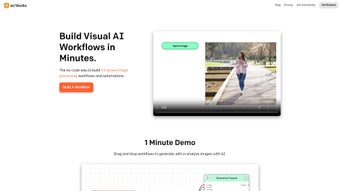
ML Blocks positions itself as a comprehensive no‑code AI tool for image creation, editing, and analysis. Its most compelling capability is the visual workflow canvas, where users can chain together pre‑built “blocks” that represent distinct AI or classic image operations. For example, a typical pipeline might start with a “Stable Diffusion – Text‑to‑Image” block, flow into an “In‑painting” block for touch‑ups, then pass through a “Resize & Compress” block before finally exporting the result to a cloud storage bucket. Because each block runs on the provider’s GPU‑accelerated cloud, even high‑resolution outputs (up to 4K) are generated in seconds, far faster than a local laptop could manage.
Collaboration is baked into the platform. Teams can share workflow templates, assign role‑based permissions (viewer, editor, admin), and track version history, which is especially useful for agencies that need to hand off projects between designers, copywriters, and marketers. Security is another differentiator: all data transfers are protected with TLS 1.3, data at rest is encrypted, and the service complies with GDPR, CCPA, and SOC 2 standards, ensuring that proprietary brand assets remain confidential.
From a business perspective, ML Blocks offers a freemium model that lets new users explore the basics without a credit card, while the Pro tier unlocks higher‑resolution rendering, priority GPU queues, API access, and extended batch limits. The combination of an intuitive UI, cutting‑edge AI back‑ends, robust collaboration tools, and a flexible pricing structure makes ML Blocks a compelling choice for anyone looking to download a secure, up‑to‑date image‑processing solution without learning code.
Features, Installation & First‑Time Use: Getting Up and Running Quickly
- Drag‑and‑Drop Workflow Builder – Assemble image pipelines visually.
- Stable Diffusion Integration – Generate photorealistic images or perform in‑painting with state‑of‑the‑art diffusion models.
- OpenAI Generative Blocks – Access DALL‑E, GPT‑4‑Vision, and other OpenAI tools within the same canvas.
- Built‑In Editing Suite – Crop, resize, rotate, recolor, and apply filters without leaving the platform.
- Batch Processing – Run the same workflow on hundreds of images automatically.
- Collaboration & Version Control – Share templates, set permissions, and revert to previous workflow versions.
- API & Webhooks – Trigger workflows from external applications or integrate with CMS, Shopify, and more.
- Secure Cloud Execution – All AI inference runs on encrypted cloud servers with GDPR/CCPA compliance.
- Real‑Time Preview – See results instantly as you adjust parameters.
- Multi‑Platform Access – Works on Windows, macOS, Linux browsers, as well as iOS and Android tablets via responsive web app.
Installation & First‑Time Use
Because ML Blocks is a cloud‑native SaaS product, there is no traditional “download and install” process for the core engine. Getting started is as simple as visiting mlblocks.com, clicking the Sign Up button, and creating a free account. After confirming your email, you are taken directly to the dashboard where you can create your first workflow.
Step‑by‑step guide:
- Create an Account – Choose the free tier or start a 14‑day Pro trial. No credit card is required for the free plan.
- Verify Email – Click the verification link sent to your inbox to unlock full dashboard access.
- Select a Template – The platform offers starter templates (e.g., “Social Media Banner Generator”). Choose one or start from scratch.
- Drag Blocks onto the Canvas – From the left sidebar, drag “Stable Diffusion – Text‑to‑Image” onto the workflow area, then add “Resize” and “Recolor” blocks as needed.
- Configure Parameters – Click each block to set prompts, resolution, color palettes, or cropping dimensions.
- Run a Test – Press the “Execute” button. A real‑time preview appears on the right, showing the generated or edited image.
- Save & Export – Save the workflow for future use, export the final image, or set up an API endpoint to retrieve results programmatically.
The web app automatically updates to the latest AI models, so you never need to manually download updates. If you prefer a desktop‑like experience, ML Blocks provides a lightweight Electron wrapper for Windows and macOS that can be downloaded and installed in minutes. The wrapper simply launches the web UI in a dedicated window, preserving the same secure, cloud‑based execution model while giving you an app‑style shortcut on your desktop.
Compatibility, Pros & Cons, and Frequently Asked Questions
Supported Platforms
- Windows 10/11 (via browser or optional Electron app)
- macOS 12+ (Safari, Chrome, or Electron wrapper)
- Linux (any modern browser – Chrome, Firefox, Edge)
- iOS 14+ (responsive web app; no native app yet)
- Android 8+ (responsive web app; tablet‑optimized UI)
The browser‑first approach guarantees access from virtually any device with an internet connection. For power users, the optional desktop wrappers provide a more “app‑like” feel while still leveraging cloud processing for AI‑heavy tasks.
Pros
- No Coding Required – The drag‑and‑drop interface lowers the entry barrier for non‑technical users.
- Cutting‑Edge AI Models – Integrated Stable Diffusion and OpenAI tools keep you on the forefront of image generation.
- Secure Cloud Processing – All data is encrypted in transit and at rest, complying with major privacy regulations.
- Scalable Batch Workflows – Automate processing of large image libraries without manual intervention.
- Cross‑Platform Accessibility – Works on Windows, Mac, Linux, iOS, and Android via a responsive web UI.
- Free Tier Available – Test the core features without any financial commitment.
- Collaboration Features – Share workflows, set permissions, and maintain version history.
Cons
- Internet Dependency – All AI inference runs in the cloud, so a stable connection is required.
- Limited Offline Editing – Basic cropping/resizing can be done offline only with the optional desktop wrapper, but AI features remain online.
- Pricing for High‑Volume Users – The Pro plan can become costly for enterprises processing thousands of images daily.
- Learning Curve for Advanced Workflows – While basic pipelines are easy, complex branching logic may require time to master.
- No Native Mobile Apps – Mobile access is limited to the browser version, which may feel less fluid on small screens.
Frequently Asked Questions (FAQ)
Is ML Blocks really free to use?
Yes, ML Blocks offers a free tier that includes access to core workflow blocks, up to 50 image generations per month, and basic editing tools. No credit card is required to start, and you can upgrade to the Pro plan whenever you need higher limits or advanced features.
Can I run ML Blocks on my own server for offline use?
Currently the heavy AI computation is hosted on ML Blocks’ managed cloud infrastructure. While you can host the front‑end wrapper on a private network, the generative models themselves always run on the provider’s secure GPUs, so a completely offline deployment is not supported.
How does ML Blocks handle my data privacy?
All uploads and API calls are encrypted with TLS 1.3, and files stored on the platform are encrypted at rest. ML Blocks is certified under GDPR, CCPA, and SOC 2, and it does not retain any training data from your images beyond the short period needed for processing.
What limits exist on batch processing in the free plan?
The free plan allows up to 200 MB of total batch size per day and a maximum of 100 images per batch. If you need larger batches, the Pro subscription raises these limits to 5 GB per day and unlimited image counts, subject to GPU queue availability.
How does the collaboration feature work for remote teams?
Team owners can invite members via email and assign roles (viewer, editor, admin). Every change creates a version snapshot, and you can revert to any previous state. Comments can be attached to individual blocks, making it easy to give feedback without leaving the canvas.
What output formats does ML Blocks support?
ML Blocks can export PNG, JPEG, WebP, and TIFF files. For AI‑generated images you can also request lossless .exr files when working with the Pro tier. Export destinations include direct download, cloud storage links (Amazon S3, Google Cloud), or webhook callbacks for automated pipelines.
Conclusion: Should You Add ML Blocks to Your Creative Arsenal?
After testing the platform for several weeks, it’s clear that ML Blocks delivers on its promise of democratizing powerful image AI. The visual workflow builder removes the steep learning curve traditionally associated with diffusion models, while the cloud‑first architecture guarantees speed, reliability, and continuous model upgrades. Security and collaboration features make it suitable for both solo freelancers and larger teams that need to protect brand assets. The primary drawbacks—mandatory internet connectivity and higher costs for massive batch volumes—are understandable trade‑offs for a managed service. If your organization regularly produces visual assets, needs to scale batch operations, or simply wants to experiment with AI‑generated imagery without hiring a data scientist, the free tier provides ample room to explore before committing financially.
In short, ML Blocks is a robust, secure, and future‑proof solution that bridges the gap between creative intent and cutting‑edge AI execution. By removing technical barriers and offering a transparent pricing model, it empowers creators to focus on what matters most: compelling visual storytelling. Ready to transform your image workflow? Click the download link below, create a free account, and start building your first AI‑driven visual masterpiece today.



.png)



